Kanban Board
The six-column Kanban board for task management.
Each project has a Kanban board with six columns representing the task lifecycle.
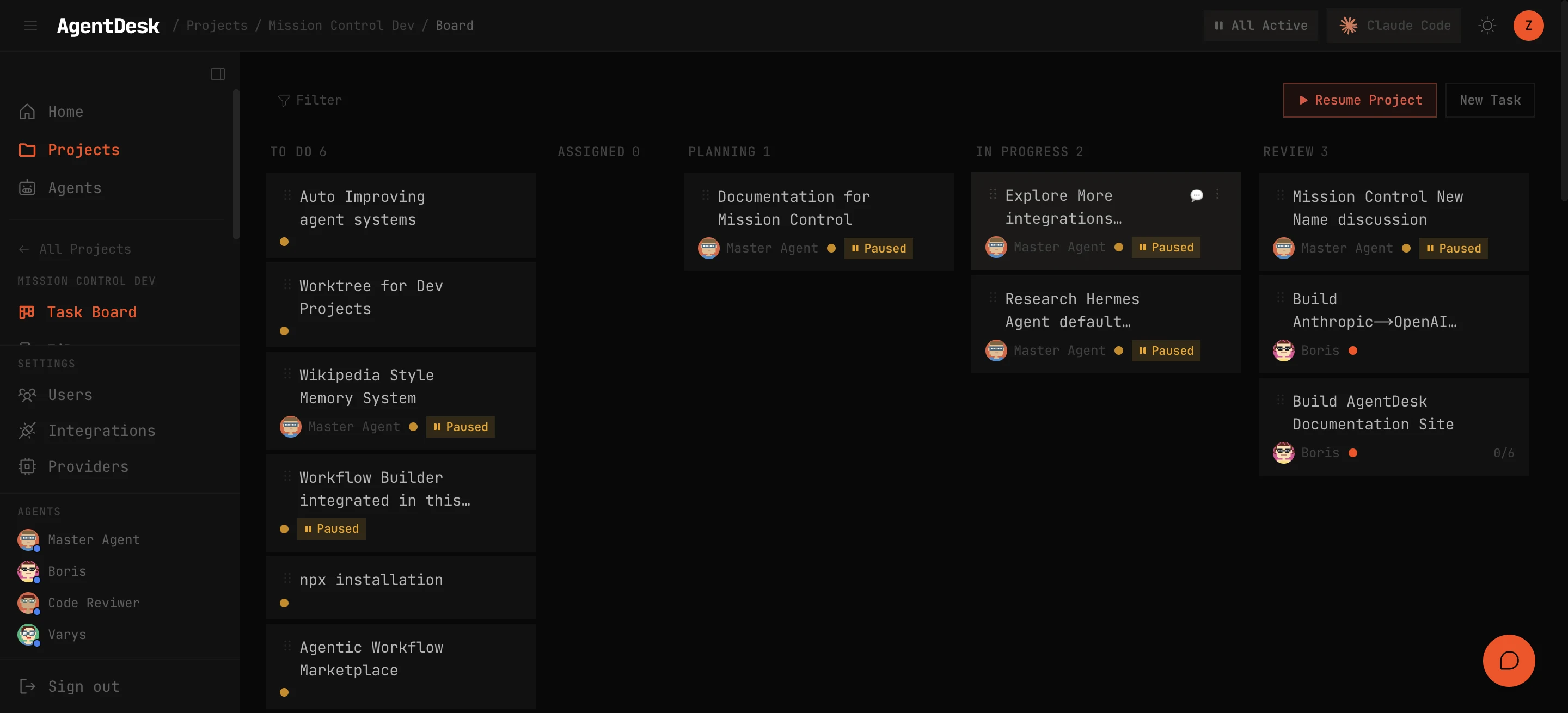
Columns
| Status | Description |
|---|---|
| Todo | Tasks waiting to be picked up |
| Assigned | Tasks assigned to an agent but not yet started |
| Planning | Agent has acknowledged the task and is planning its approach |
| In Progress | Agent is actively working on the task |
| Review | Work is complete and waiting for human review |
| Done | Task approved and closed |
Task Cards
Each card on the board shows:
- Title and priority indicator (color-coded: red=critical, orange=high, yellow=medium, gray=low)
- Assignee avatar
- Subtask progress (e.g., 3/5 done)
- Tags for categorization
- Comment count
Interactions
- Drag and drop tasks between columns to change status
- Click a card to open the task detail modal
- Filter by assignee, priority, tags, or status
- Sort by priority, creation date, or last updated
Priority Levels
| Priority | Label | Usage |
|---|---|---|
| 0 | Critical | Blocking issues that need immediate attention |
| 1 | High | Important work for the current sprint |
| 2 | Medium | Standard work items |
| 3 | Low | Nice-to-have improvements |
Tags
Create custom tags with colors to categorize tasks (e.g., “bug”, “feature”, “docs”). Tags can be project-scoped or global.